Build an AI Voice Lead Intake Workflow with Retell AI and n8n
In this article (13)
A plumber might be on a job when a prospective customer calls. An electrician may receive an enquiry after business hours. In either case, the business needs a reliable way to capture the request, determine whether it needs urgent human attention, and arrange a follow-up.
A voice AI agent can help with initial call intake: answering supported inbound calls, asking a few structured questions, and sending a useful record to the team’s existing tools. It is not a substitute for emergency services, a qualified tradesperson, or a reliable human escalation process.
This guide explains how to design that workflow using Retell AI for the phone conversation and n8n for post-call automation. Make.com is an alternative workflow engine, not an additional required component. The examples use a fictional electrical contractor, Apex Electrical, and are educational rather than results from a live client deployment.
What we will build
For an inbound enquiry, the system should:
- Tell callers they are speaking with an AI assistant and provide any recording notice required for the business’s location and setup.
- Collect the caller’s name, callback number, service location, problem description, and preferred follow-up window.
- Recognize an apparently urgent situation and direct the caller to appropriate human or emergency help rather than attempting a diagnosis.
- Extract structured fields after the call using Retell’s post-call extraction.
- Receive a verified Retell webhook and create or update a lead in the CRM.
- Notify staff of requests needing review, without assuming a message or booking has been delivered until the provider confirms it.
The first version will request a callback, not automatically promise an appointment. Confirmed scheduling requires an additional real-time availability and booking integration, covered later.
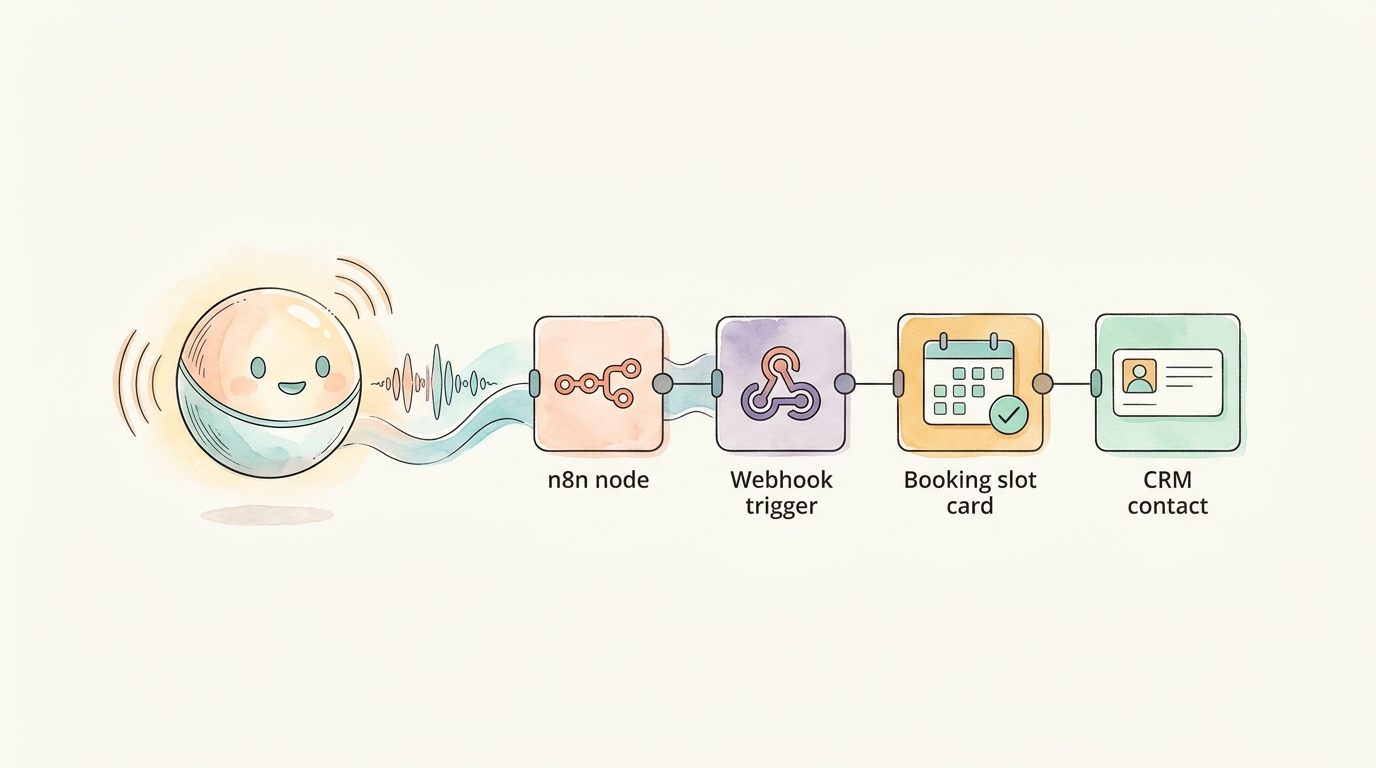
1. Understand the architecture
Customer calls the business number
                |
                v
  Telephony / Retell phone routing
                |
                v
       Retell voice agent
   - discloses AI involvement
   - gathers relevant details
   - offers human escalation
                |
                | after call: call_analyzed
                v
 Signature-verifying HTTPS endpoint
                |
                v
        n8n Webhook trigger
                |
                v
    Filter + normalize call data
                |
                v
        Deduplicate by call_id
                |
         +------+-------+
         |              |
         v              v
    CRM upsert      Staff notification
         |
         v
  Human review and follow-up
Retell publishes voice-call events such as call_started, call_ended, and call_analyzed. The distinction matters: call_ended does not include post-call analysis; call_analyzed does. A workflow that requires extracted lead fields should act on call_analyzed, not assume those fields are present when the connection ends. See Retell’s webhook event documentation.
2. Configure the voice agent for a narrow job
Create a voice agent in Retell and connect it to a suitable inbound phone number or supported telephony route. Start with one service category and a short, predictable conversation instead of an agent that tries to quote prices, diagnose faults, and book jobs all at once.
Example agent instructions
The following is a starting prompt, not a complete safety or compliance policy:
Role: You are the AI call-intake assistant for Apex Electrical.
Always identify yourself as an AI assistant, not a human employee.

Goal: Collect enough information for a team member to call back.
Ask one question at a time, and confirm important details.

Collect only what is necessary:
- Caller's name
- Best callback number (confirm it; do not assume caller ID is correct)
- Service address or general area
- Short description of the electrical issue
- Preferred callback time and time zone

Do not:
- Diagnose electrical hazards or provide repair instructions
- Guarantee prices, availability, arrival times, or bookings
- Invent business policies or service areas
- Claim a message was delivered unless a tool confirms it

Escalation:
- If a caller reports fire, smoke, sparking, electric shock,
  or immediate danger, advise them to move away from danger
  and contact local emergency services as appropriate.
- Do not instruct callers to touch wiring or operate equipment
  in a hazardous area.
- Offer a transfer to a human if configured and available.
  Otherwise explain the team's actual callback process.

Before ending, briefly repeat the collected details and ask
whether they are accurate. Follow the business's approved
call-recording and privacy disclosure procedure.
A well-scoped prompt reduces unsupported promises, but prompts alone do not guarantee safe or correct behavior. Add transfer or escalation tools where needed and test edge cases before accepting real calls. Retell supports custom functions and transfer-related features; their configuration depends on the selected agent architecture. Custom function documentation.
3. Define post-call extraction fields
In the Retell agent editor, use Post Call Extraction to define the information you want from the completed conversation. Retell documents custom category types including Text, Selector, Boolean, and Number. The exact fields below are ones you configure; they are not automatic universal Retell properties. Retell post-call extraction guide.
| Field you create | Suggested type | Purpose |
|---|---|---|
caller_name |
Text | Name as stated by caller |
service_address |
Text | Location needing service |
service_type |
Selector | e.g. fault investigation, installation, other |
issue_description |
Text | Concise description of the problem |
is_emergency |
Boolean | Flags language suggesting immediate danger for human review |
preferred_callback_window |
Text | Requested date/time, including time zone when known |
appointment_requested |
Boolean | Caller asked to book; does not mean a booking exists |
Write descriptions for these extraction fields carefully. For example, is_emergency should mean the caller reported signs of immediate danger, not the system has professionally assessed the job as an emergency. Review the extracted result against the transcript, especially before taking high-impact actions.
Example call_analyzed data
This is a shortened illustrative payload using the field names defined above, not a complete Retell response:
{
  "event": "call_analyzed",
  "call": {
    "call_id": "call_example_001",
    "call_type": "phone_call",
    "from_number": "+15550102030",
    "direction": "inbound",
    "call_analysis": {
      "call_summary": "Caller requested a callback about a faulty light switch.",
      "user_sentiment": "Neutral",
      "custom_analysis_data": {
        "caller_name": "Alex Taylor",
        "service_address": "Example Street, Exampletown",
        "service_type": "fault investigation",
        "issue_description": "Light switch intermittently stops working",
        "is_emergency": false,
        "preferred_callback_window": "Tomorrow afternoon",
        "appointment_requested": false
      }
    }
  }
}
Notice the nesting:
- Webhook event:
event - Call record:
call - Post-call result:
call.call_analysis - Your configured custom fields:
call.call_analysis.custom_analysis_data
The built-in sentiment field is descriptive text such as Positive, Negative, Neutral, or Unknown, not a universal numeric sentiment score. The call record can also expose transcript or recording information depending on its type and settings, but the CRM does not automatically need raw audio. Refer to the Retell Get Call API.
4. Receive webhooks securely
Retell’s webhook contains an X-Retell-Signature header. Do not treat a public n8n or Make webhook URL as authenticated merely because it is difficult to guess. Retell recommends signature verification using the raw request body and the appropriate webhook-capable API key. Retell webhook security guide.
A practical production pattern is to place a small HTTPS endpoint in front of n8n. That endpoint verifies Retell’s signature and forwards only valid requests to an authenticated n8n Webhook. If you use a different architecture, implement equivalent verification before trusting or processing incoming data.
Minimal Node.js verification gateway
The example below uses Node.js 18+ and the official Retell SDK. It forwards valid events to an n8n Webhook configured for Header auth (X-Ingest-Token). It is a simple starting point; for higher volumes, use a durable queue and dedicated retry/error handling.
// npm install express retell-sdk
import express from 'express';
import { Retell } from 'retell-sdk';

const app = express();
app.use('/retell-webhook', express.raw({ type: 'application/json' }));

app.post('/retell-webhook', async (req, res) => {
  const rawBody = req.body.toString('utf8');
  const signature = req.header('x-retell-signature');

  const valid = signature && await Retell.verify(
    rawBody,
    process.env.RETELL_API_KEY,
    signature
  );

  if (!valid) return res.sendStatus(401);

  try {
    const response = await fetch(process.env.N8N_WEBHOOK_URL, {
      method: 'POST',
      headers: {
        'Content-Type': 'application/json',
        'X-Ingest-Token': process.env.N8N_INGEST_TOKEN
      },
      body: rawBody,
      signal: AbortSignal.timeout(5000)
    });

    if (!response.ok) return res.sendStatus(502);
    return res.sendStatus(204);
  } catch {
    return res.sendStatus(502);
  }
});

app.listen(process.env.PORT || 3000);
Keep RETELL_API_KEY, N8N_WEBHOOK_URL, and N8N_INGEST_TOKEN in server-side environment variables. Never expose these credentials in browser JavaScript or published screenshots. Set the n8n Webhook to authenticate using the same header name and secret. Use HTTPS, restrict access, monitor failures, and rotate exposed secrets.
Retell documents a 10-second webhook timeout and up to three retries on unsuccessful responses. Those are delivery mechanics, not a promise that CRM synchronization will finish within 10 seconds. Webhook retries also make deduplication essential. Retell webhooks overview.
5. Build the n8n workflow
Create a workflow with the following nodes:
Webhook (POST, Header auth, respond immediately)
  -> IF (event is call_analyzed)
  -> Code (normalize fields)
  -> Data store / CRM lookup (call_id already processed?)
  -> IF (new call)
  -> CRM create or update
  -> IF (requires urgent review)
  -> Staff alert
  -> Mark call_id processed / record delivery status
In n8n, the Webhook node has separate Test and Production URLs. Test with an authorized sample request first; publish the workflow and use its Production URL for the gateway once the mappings are stable. n8n Webhook documentation.
Current n8n Code-node example
Use a Code node in Run Once for All Items mode after the event filter. The older Function node terminology used in some tutorials is obsolete. This example assumes n8n’s Webhook node supplies the JSON request in item.json.body, which is its typical parsed webhook structure; inspect your actual incoming execution before finalizing the mapping.
const output = [];

for (const item of $input.all()) {
  const payload = item.json.body ?? item.json;
  if (payload.event !== 'call_analyzed') continue;

  const call = payload.call ?? {};
  const analysis = call.call_analysis ?? {};
  const fields = analysis.custom_analysis_data ?? {};

  if (!call.call_id) {
    throw new Error('Missing call_id: cannot safely deduplicate lead');
  }

  output.push({
    json: {
      source: 'retell',
      source_call_id: call.call_id,
      caller_name: fields.caller_name ?? null,
      phone_number: call.from_number ?? null,
      service_address: fields.service_address ?? null,
      service_type: fields.service_type ?? null,
      issue_description: fields.issue_description ?? null,
      requires_urgent_review: fields.is_emergency === true,
      preferred_callback_window:
        fields.preferred_callback_window ?? null,
      appointment_requested: fields.appointment_requested === true,
      call_summary: analysis.call_summary ?? null,
      follow_up_status: 'needs_review'
    }
  });
}

return output;
This is normalization, not verification. Signature verification happens earlier at the gateway. It also does not check whether an extracted name or service address is factually correct; a human should review ambiguous or safety-critical data.
Prevent duplicate CRM records
Use source_call_id as your idempotency key. Before creating a lead, look it up in a persistent database or CRM field with a unique constraint where available. If it exists, update the existing record rather than creating another. For concurrent webhook deliveries, a plain “search then create” sequence may still race; an atomic upsert or unique-key conflict handling is safer.
Track separate fields for crm_sync_status and notification_status. This makes it possible to retry a failed alert without duplicating the lead. n8n’s execution history and error workflows are useful for diagnosing failed jobs, but they do not replace your own delivery-state design.
6. Send useful notifications, not a data dump
A staff alert might contain:
New electrical enquiry — review required
Caller: Alex Taylor
Problem: Intermittent light-switch fault
Area: Exampletown
Preferred callback: Tomorrow afternoon (time zone unconfirmed)
CRM lead: [internal record link]
Only add a recording or transcript link when the recipient is authorized to access it. Avoid broadcasting precise addresses, sensitive disclosures, or raw recordings to large group chats. A short operational summary is usually enough.
You can deliver staff notifications through email, Slack, Microsoft Teams, or a properly configured messaging provider. WhatsApp delivery is not automatic: it requires an appropriate Business Platform integration, approved templates in relevant cases, and compliance with the platform’s messaging rules. Do not promise a message was sent merely because the automation attempted to send it. See Meta’s WhatsApp Business Platform overview.
7. What about booking appointments during the call?
This is a different integration from post-call lead capture.
A call_analyzed event is produced after the conversation. If the caller asks, “Can someone come on Thursday at 3 pm?”, the agent cannot confirm that slot based on post-call analysis alone.
For genuine live booking, add a Retell custom function or supported integration tool that can:
- Query the actual calendar or scheduling system for available slots.
- Present available options to the caller, with the correct time zone.
- Obtain explicit confirmation of the intended appointment.
- Create the booking through the scheduling API.
- Confirm success only after the API returns a successful booking result; otherwise offer a callback.
The workflow must account for overlapping requests and conflicting bookings. A calendar query followed by a separate write is not necessarily an atomic reservation. See Retell custom functions.
For an initial implementation, a callback request is often safer and easier to maintain than a booking workflow that risks promising unavailable appointments.
8. Using Make.com instead of n8n
If your team already uses Make, you can reproduce the post-verification workflow with a Custom Webhook, filters, a router, CRM modules or HTTP requests, and a messaging action. Make is an alternative to n8n here; you do not need to run the same call event through both.
Make’s instant webhooks can start scenario runs in parallel by default. Use a persistent deduplication mechanism and consider ordered processing only when the business logic requires it. The signature-verification requirement still applies: place a verified gateway before Make or implement an equivalent authenticated verification layer. Make webhook documentation.
| Decision | n8n | Make.com |
|---|---|---|
| Visual workflows | Yes | Yes |
| JavaScript transformations | Built-in Code node | Use supported modules or external services as needed |
| Hosting | Cloud or self-hosted options | Hosted platform |
| Typical reason to choose | Custom logic, deployment control, developer workflows | Managed visual automation and existing Make integrations |
Choose based on your current stack, security requirements, maintenance capacity, and total costs—not on an assumption that one tool is automatically faster or more reliable.
9. Testing checklist before accepting real calls
Test with synthetic caller details, not a real customer’s information:
- Normal new enquiry: all expected fields appear in the CRM.
- Caller refuses to give a name or address: missing fields stay empty; the agent does not invent them.
- Caller ID is unavailable or incorrect: callback number is confirmed verbally.
- Caller reports smoke, sparking, injury, or another hazard: safe escalation occurs without DIY instructions.
- Caller asks for a guaranteed visit: the agent distinguishes a callback request from a confirmed booking.
- Caller requests a human: transfer or honest fallback works as configured.
- Caller changes information mid-call: final extracted details reflect the correction.
- Duplicate
call_analyzedevent: CRM record is updated, not duplicated. - Invalid webhook signature: gateway rejects the request.
- CRM, calendar, or messaging provider is unavailable: failures are logged and retried appropriately.
- Time zones, accents, background noise, and interruptions are tested.
- Recording notices, data retention, and access policies have been reviewed for applicable jurisdictions.
Also monitor connected-call rate, incomplete-intake rate, false urgent flags, missed human handoffs, CRM duplication, webhook failure rate, and the time between call completion and actionable staff notification. Measure these in your own environment rather than presenting vendor benchmarks as guarantees.
10. Security, privacy, and operational limits
Treat this workflow as a system that handles personal data, not merely a clever chatbot demo.
Privacy and consent: Inform callers appropriately about the AI system and any recording/transcription. Applicable consent rules depend on jurisdiction, where participants are located, and how the service is used. Obtain qualified legal guidance for the deployment region rather than assuming a single global rule.
Data minimization: Store only fields the team needs. Restrict access to call recordings and transcripts, define retention limits, and use provider privacy controls where appropriate. Keep API keys in a secrets manager or protected environment configuration.
Reliability: Decide what happens if telephony, Retell, the signature gateway, n8n, or the CRM is unavailable. Provide a human fallback and monitor failures. An always-on goal is not a 100% availability guarantee.
Safety: An AI agent can flag an urgent-sounding call, but it must not be relied on to determine whether an electrical situation is safe. Human review and emergency escalation rules remain essential.
Conclusion
A well-designed voice lead intake workflow has three distinct parts: a constrained conversation, a trustworthy event pipeline, and a human follow-up process.
Retell can conduct the initial conversation and produce structured post-call analysis. A verified webhook can hand that information to n8n or Make. The workflow can then create a traceable CRM record and alert the right person—with safeguards for retries, missing data, privacy, and urgent situations.
Start with capture and callback, validate the entire path with test calls, and introduce live scheduling only when your calendar integration can actually confirm bookings. That approach produces a more dependable system than promising instant dispatch or guaranteed revenue from an untested voice agent.
Official documentation and further reading
The implementation details above were checked against these sources (accessed November 2026):